
(Note -- Items that do not have hyperlinks used to take you to our online store, which is being "remodeled". Please call if you want to order any of these products.)
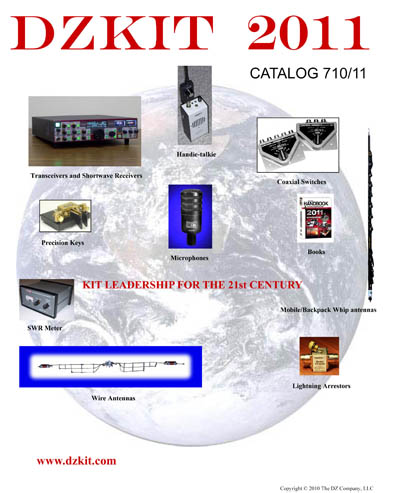
Books (ARRL and CQ publications)
Coax switches (Alpha-Delta)
Consignments (Please visit our retail store in Loveland -- Valley Ham Shack, at 4321 W. Eisenhower Blvd.)
Firmware downloads
Handie-Talkies
Lightning Arrestors (Alpha-Delta)
Manuals and Construction Notes
Microphones (Heil)
Morse code keys (Kent)
Software (Free!)
SWR Meters
Wire Antennas (Alpha-Delta)
Sienna Assembly Manual (6MB) Rev D - 3/6/11
Sienna Operator's Manual - Rev A - 3/5/11
Sienna Service Manual - Rev A - 3/5/11
Sienna Block Diagram (869KB)
Note: We are currently shipping Controller Rev B1, Rx Rev B3, Tx Rev B5, Chassis Rev B, Cables Rev B, and Firmware Rev B.01.05 (Main uP), and B.01.01 (Keyer uP). Everything else is still at Rev A with no changes planned.
Sienna Construction Note - 8/20/09 - RS-232 interface assembly, top cover warp (All models)
Sienna Construction Note - 10/25/09 - Cabling issues
Sienna Construction Note - 12/09/09 - IF Out signal level improvement mod (Rev A and A1 Rx boards only) (Updated 3/31/10)
Sienna Construction Note - 2/27/10 - 12-button keypad doesn't work and mono plug in manual key jack keys Tx all the time (Rev A cables)
Sienna Construction Note - 4/30/10 - On-off switch difficult to insert in front panel (All models)
Sienna Construction Note - 5/26/10 - Rev B Controller, Receiver, Transmitter and Firmware now in production
Sienna Construction Note - 6/10/10 - All models. Fix for meter backlight "spotlight" effect
Sienna Construction Note - 6/22/10 - All models. AM receive sensitivity improvement
Sienna Construction Note - 6/26/10 - All models. Headphones pick up RF when using 100W amp
Sienna Construction Note - 6/27/10 - All models. Under-rated capacitors on 100W amp with high VSWR
Sienna Construction Note - 3/5/11 - All models. Tx Rev A->B modification procedure
HT-7 40M AM Handie-Talkie (1.8MB)
HT-7 Construction Note - 6/09/09 - Cabling, connector fit issues
HM-17 SWR/Reflected Power Meter (1MB)
Software
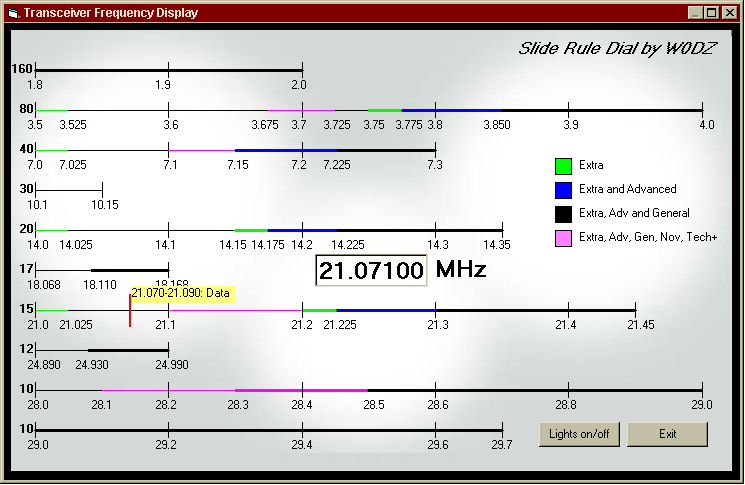 Add a slide rule dial to your Yaesu FT-1000 (all variations), and some Kenwood and Icom rigs, as described in the February, 2002 issue of QST magazine. This Visual Basic program gives you information on band edges (including voice and CW sub-bands for all classes of license), and also pops up displays when the dial crosses a section of band that is defined in the ARRL voluntary band plan. All bands from 160 through 10 meters are shown simultaneously. "Front" and "Rear" memories for each band are shown as blue and green circles.
Free download! These zip files include Visual Basic 6.0 source code and executable. You will need MSVBVM60.DLL (not included in zip) and mscomm32.ocx (included in some zips) to run it. Depending upon how old your O/S is, you may also need to install other DLLs. They should work on any Windows O/S after and including Windows 98SE. These contributed programs are offered without warranty, but if you have trouble, give us a call and we'll see what we can do to help.
The QST article
Yaesu FT-100 version
Yaesu FT-1000, 1000D version
Yaesu FT-1000MP, MP Mk V versions
Kenwood TS-570D version
Kenwood TS-870S version
Kenwood TS-2000 version
Icom 746 version (may be adaptable to other Icom rigs, but requires a change to rig ID code)
Back to index
Here's the procedure for downloading new firmware into your Sienna:
1. If you purchased the internal PC option, go to step 4. The necessary software has already been installed on your PC and there is no need to connect any cables. In fact, if you connect Sienna to your home network via the built-in Ethernet port, you can do this entire operation right from the Sienna! If you have an Atmel STK-500 or similar programming board, you can also skip use of Megaload and go to step 4.
2. Install Megaload software on your PC. Note: If you do not have the Windows .NET Framework installed, you will be prompted to install it and provided a link to Microsoft's download site to install it. This step only needs to be done once.
3. If using an external PC, connect a serial cable between your PC and the Sienna's COM port on the back panel.
4. Download the latest firmware files (sienna_rev_B0105.hex and sienna_rev_B0105.eep for Rev A controller boards, or sienna_rev_B0205.hex and sienna_rev_B0205.eep for Rev B controller boards) to a folder on your PC. The hex file is the actual binary code for Sienna's main microprocessor. The eep file is the EEPROM data such as memories and other information that must be saved when you turn the rig off. Both are in the Intel Hex format (text files). If you have an Atmel STK-500 or other Atmel programming board, you can also update your Keyer firmware using these files: Keyer_rev_B0101.hex and Keyer_rev_B0101.eep. If you're using the Atmel board, download all these files into the two processors, cycle power once and you're done!
5. Run Megaload. Using the browse buttons at the top, browse to the path where you have stored the two files mentioned in step 4 and enter the .hex file in the top box and the .eep file in the second box.
6. If you are using Sienna's internal PC, select port COM2 and set the baud rate to 9600. Otherwise use whatever port you have connected Sienna to on your external PC. Do not enable DTR or RTS. Do not check any of the "Bootloader Lock Bits" boxes.
7. If your Sienna has a front panel, press the Menu button and then rotate the small tuning knob until you see the page containing the option "Reprogram uP:". Rotate the large knob until that item is highlighted. Rotate the small knob to the right. The download will begin immediately and you should see data being transferred in the status box in the Megaload screen. When finished, the rig will re-start and you can close Megaload.
If your Sienna does not have a front panel, first close the COM port on Megaload's control panel. From Hyperterm, send the command "RP;". You then have 10 seconds to finish the remainder of the steps: from Hyperterm, select "disconnect" so that Hyperterm no longer controls the port. Then, from the Megaload window, re-open the COM port. The download will begin within 10 seconds. When finished, the rig will re-start and you can close Megaload. NOTE: Vista and Windows 7 no longer include Hyperterm as a standard part of the O/S, but you can simply copy hypertrm.dll and hypertrm.exe from any convenient location on an XP machine or search online for a download site. No installation is required - they can go in any directory.
8. We suggest cycling power once after the download to re-synchronize the Main and Keyer microprocessors.
That's all there is to it.
Microsoft and Windows are U.S. registered trademarks of Microsoft Corporation